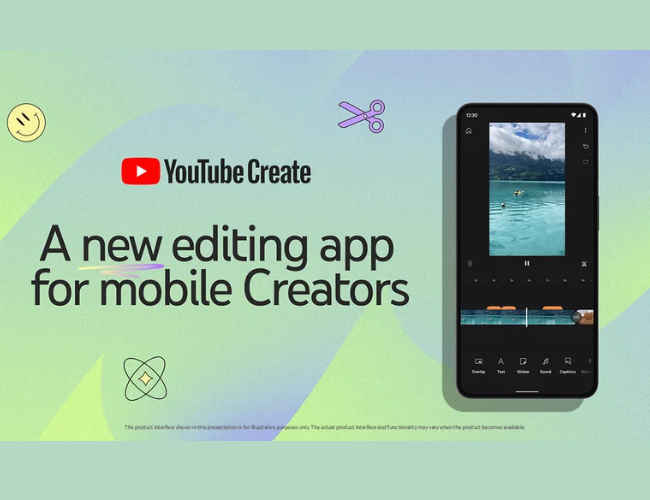
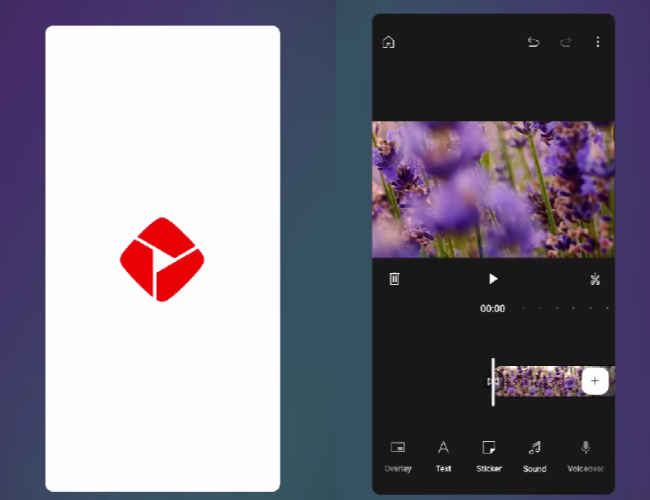
YouTube has introduced its new mobile app called ‘YouTube Create’. This app offers an easy way for creators to edit their videos right from their phone. YouTube Create is currently in beta on Android in select countries, including India, with support for iOS coming in 2024.
“We’re excited to introduce the beta version of YouTube Create, a brand new app that gives mobile creators the tools they need to take their videos to the next level,” the company said on September 21.
introducing YouTube Create a new easy-to-use editing app that helps you make high-quality vids & can publish to YouTube now in *beta* in 8 countries on Android we want your feedback download in Play Store: https://t.co/eV3LZP8N2b more info: https://t.co/HnbJhl8oR7 pic.twitter.com/1tCyKAYvtu
— TeamYouTube (@TeamYouTube) September 21, 2023
With YouTube Create, users can easily make high-quality videos with editing tools, effects, filters, and transitions all in an easy-to-use interface – without the need for complicated editing tools or desktop software.
Also read: YouTube Playables will let you play games, just like in Netflix app
“We’ve been building YouTube Create with great feedback from creators in India and Singapore during our early tests, and now we’re excited to start getting this beta version of YouTube Create into the hands of creators in the U.S., UK, France, Germany, South Korea, and Indonesia,” the company said.
Also read: Google will add new vertical live feed on YouTube for mobile viewers
YouTube Create is a free of charge app which offers a handful of features and tools for mobile creators, helping them to elevate their videos and make content that their viewers will love.
Below are a few features that YouTube Create offers:
Audio cleanup: This feature helps to remove unwanted background noises.
Auto-captions: It automatically adds captions to the videos in English, Hindi, and Spanish.
Filters/effects/transitions: You can easily add filters, effects, and transitions to make the videos pop.
Royalty-free music: Get access to thousands of royalty-free songs and sound effects—all within YouTube Create. These music tracks and sound effects are copyright-safe and can be freely used in videos you monetise.
Publish directly to YouTube: Easily create and publish both Shorts and longer videos directly to your YouTube channel with just the tap of a button.
“This is just the start of all the amazing features we have planned for YouTube Create, so stay tuned for even more tools & features to come!” the company said.
You can download the new YouTube Create beta by heading to the Google Play Store.
In a packed hall full of analysts and the world's media, Intel CEO Pat Gelsinger flagged off what he referred to as the “AI PC” era during his opening keynote at the third edition of Intel Innovation event. Gelsinger demonstrated this with a hitherto unnamed (not to mention unreleased) laptop running on Intel’s Lunar Lake chip, estimated to arrive some time in the second half of 2024.
We are at Intel Innovation 2023, where Intel is going to showcase interesting ways AI is powering our today and tomorrow… Here’s Pat Gelsinger, CEO, Intel has started his opening keynote address#IntelInnovation #intel #ai #siliconomy @intel @IntelIndia @PGelsinger pic.twitter.com/5MN2Do8pbt
— Digit (@digitindia) September 19, 2023
This sneak peek into Intel’s platform showed how Audacity, a widely used open-source audio software, can generate a Taylor Swift-like song in a matter of seconds – proving how Intel’s about to launch end user devices like PCs and laptops that can run AI workloads locally without connecting to a cloud-based service.
Tipping his hat to the amazing work being done by the likes of Sam Altman at OpenAI and Jensen Huang at NVIDIA, powering the next set of AI breakthroughs, “The work they’re doing at the high end is really cool, as we move to trillion parameter models and beyond, this is amazing and breaking new science,” noted Gelsinger in his keynote address. “But I’ll tell you what’s even cooler if we put it in the hands of every human on earth,” he emphasized, which is essentially what Intel’s AI PC mission is all about.
Also read: Intel’s Sandra Rivera on future of AI, data centers and India’s tech moment
“AI represents a generational shift, giving rise to a new era of global expansion,” where computing is fundamental to enable a better future for all, according to Gelsinger. For developers, he reinforced how Intel is bringing AI capabilities across its hardware products and making it accessible through open, multi-architecture software solutions, helping them “create solutions to the world’s biggest challenges and to improve the life of every person on the planet.” AI is helping to drive “Siliconomy,” noted Gelsinger, a “growing economy enabled by the magic of silicon and software.” Silicon alone drives a $574 billion industry that in turn powers a global tech economy worth almost $8 trillion, according to Intel.
The work begins with silicon innovation. Intel’s five-nodes-in-four-years process development program is progressing well, Gelsinger said, with Intel 7 already in high-volume manufacturing, Intel 4 manufacturing-ready and Intel 3 on track for the end of this year. Gelsinger also showed an Intel 20A wafer with the first test chips for Intel’s Arrow Lake processor, which is destined for the client computing market in 2024. Intel 20A will be the first process node to include PowerVia, Intel’s backside power delivery technology, and the new gate-all-around transistor design called RibbonFET. Intel 18A, which also leverages PowerVia and RibbonFET, remains on track to be manufacturing-ready in the second half of 2024.
Another way Intel presses Moore’s Law forward is with new materials and new packaging technologies, like glass substrates – a breakthrough Intel announced this week. When introduced later this decade, glass substrates will allow for continued scaling of transistors on a package to help meet the need for data-intensive, high-performance workloads like AI and will keep Moore’s Law going well beyond 2030.
Intel also displayed a test chip package built with Universal Chiplet Interconnect Express (UCIe). Formed last year, the UCIe standard will allow chiplets from different vendors to work together, enabling new designs for the expansion of diverse AI workloads. The open specification is supported by more than 120 companies. The test chip combined an Intel UCIe IP chiplet fabricated on Intel 3 and a Synopsys UCIe IP chiplet fabricated on TSMC N3E process node. The chiplets are connected using embedded multi-die interconnect bridge (EMIB) advanced packaging technology. The demonstration highlights the commitment of TSMC, Synopsys and Intel Foundry Services to support an open standard-based chiplet ecosystem with UCIe.
Welcome to the AI PC era
AI is about to get more personal, too. “AI will fundamentally transform, reshape and restructure the PC experience – unleashing personal productivity and creativity through the power of the cloud and PC working together,” Gelsinger said. “We are ushering in a new age of the AI PC.”
This new PC experience arrives with the upcoming Intel Core Ultra processors, code-named Meteor Lake, featuring Intel’s first integrated neural processing unit, or NPU, for power-efficient AI acceleration and local inference on the PC. Gelsinger confirmed Core Ultra also will launch Dec. 14.
Intel Core Ultra represents an inflection point in Intel’s client processor roadmap: It’s the first client chiplet design enabled by Foveros packaging technology. In addition to the NPU and major advances in power-efficient performance thanks to Intel 4 process technology, the new processor brings discrete-level graphics performance with onboard Intel Arc graphics.
On stage, Gelsinger showed an array of new AI PC use cases, and Jerry Kao, chief operating officer of Acer, gave a sneak peek at an upcoming Acer laptop powered by Core Ultra. “We’ve been co-developing with Intel teams a suite of Acer AI applications to take advantage of the Intel Core Ultra platform,” Kao said, “developing with the OpenVINO toolkit and co-developed AI libraries to bring the hardware to life.”
Empowering the developers
Intel announced the general availability of the Intel Developer Cloud, aimed at helping developers accelerate AI using the latest Intel hardware and software innovations – including Intel Gaudi2 processors for deep learning – and provides access to the latest Intel hardware platforms, present and future.
Also read: NVIDIA, Reliance join hands to advance AI in India: LLMs in India regional languages coming soon
Additionally, Intel highlighted the 2023.1 release of the Intel Distribution of OpenVINO toolkit, the company’s AI inferencing and deployment runtime of choice for developers on client and edge platforms which includes pre-trained models optimized for integration across operating systems and different cloud solutions, including many generative AI models, such as the Llama 2 model from Meta. Intel also revealed Project Strata, the development of an edge-native software platform by 2024 with modular building blocks, premium service and support offerings.
“AI going forward must deliver more access, scalability, visibility, transparency and trust to the whole ecosystem,” Gelsinger said.
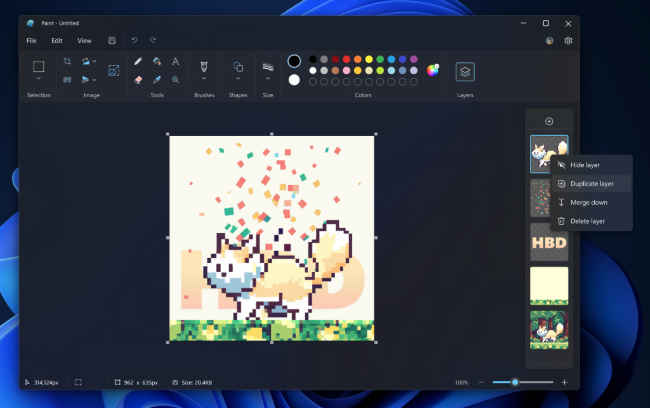
Microsoft has announced that it is starting to roll out an update for the Paint app to Windows Insiders in the Canary and Dev Channels (version 11.2308.18.0 or higher). With this update, the tech giant is introducing support for layers and transparency which are features that contemporary image editing apps have had for years.
“You can now add, remove, and manage layers on the canvas to create richer and more complex digital art,” the company said in a Windows Insider blogpost on September 18.
Also read: Microsoft says don't worry, it will protect Copilot AI users from copyright lawsuits
With layers, users can stack shapes, text and other image elements on top of each other.
How to use layers in Microsoft Paint?
Step 1. To get started, open Microsoft Paint.
Step 2. Click on the new Layers button in the toolbar.
Step 3. Now, you will see a panel on the side of the canvas. This is where you can add new layers to the canvas.
Try changing the order of layers in the panel to see how the order of stacked image elements on the canvas changes. You can also show or hide and duplicate individual layers or merge layers together.
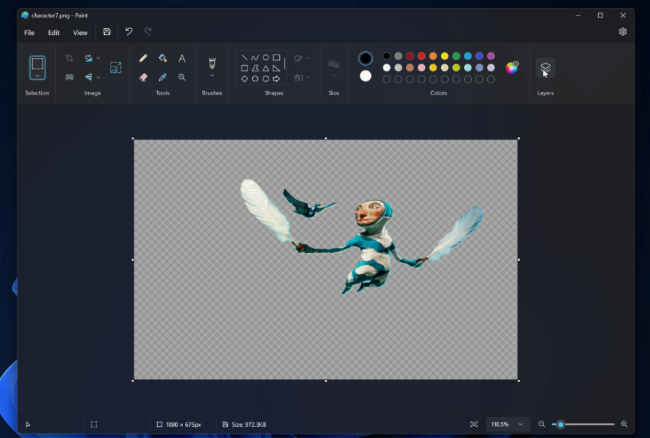
With the new update, Microsoft is also adding support for transparency, including the ability to open and save transparent PNGs.
When working with a single layer, you will notice a checkerboard pattern on the canvas which indicates the portions of the image that are transparent. “Erasing any content from the canvas now truly erases the content instead of painting the area white. When working with multiple layers, if you erase content on one layer, you will reveal the content in layers underneath,” Microsoft said.
In June, Microsoft introduced support for dark mode in Paint. "By default, Paint will adapt to your system theme preferences, but you can change this option yourself on the brand-new settings page," it said. The company also announced improvements to the zoom controls to give users more flexibility and control over the view of their content on the canvas.
Google has announced a new ‘live pointers’ feature for its presentation app Google Slides. This new feature aims to boost collaboration in Google Slides. It allows multiple people to see each other’s mouse pointers in real-time.
“To boost collaboration in Google Slides, we’re introducing live pointers, a new feature that allows you and your colleagues to see each other’s mouse pointers in real-time,” the tech giant said in a Workspace Updates blogpost on September 18.
Also read: How to use Google Docs, Slides and Sheets in Offline mode
With this update, co-creators can easily point out specific text or visual elements within a Slide in order to highlight important information and content.
The live pointers feature will help to build connections when you're collaborating in real-time with others.
If you haven't received this feature yet, just wait a little more as it is currently rolling out.
How to use live pointers in Google Slides?
This feature is off by default, so you have to enable this feature by following the below steps.
Step 1. Open Google Slides.
Step 2. Go to View.
Step 3. From the drop-down menu, select the Live pointers option.
Step 4. Then click on show my pointer.
Alternatively, you can turn the feature on by using the pointer icon in the toolbar.
It’s important to note that live pointers will remain visible across all slides until you turn them off.
To hide collaborator pointers for the current session, navigate to the present mode, or go to View > Live pointers > show collaborator pointers.
In our opinion, as the new live pointers feature facilitates real-time collaboration among multiple users working on the same presentation by allowing collaborators to see each other's mouse pointers, it makes it easier to communicate and coordinate while editing or presenting Google Slides.
Earlier this month, Google introduced new zoom keyboard shortcuts for Google Slides on web to help you zoom in, zoom out, or scale to 100 per cent. Additionally, you can now smoothly zoom in or out in Slides using the trackpad or mouse wheel with a modifier key (cmd/ctrl), making it easier to control your view of Slides.
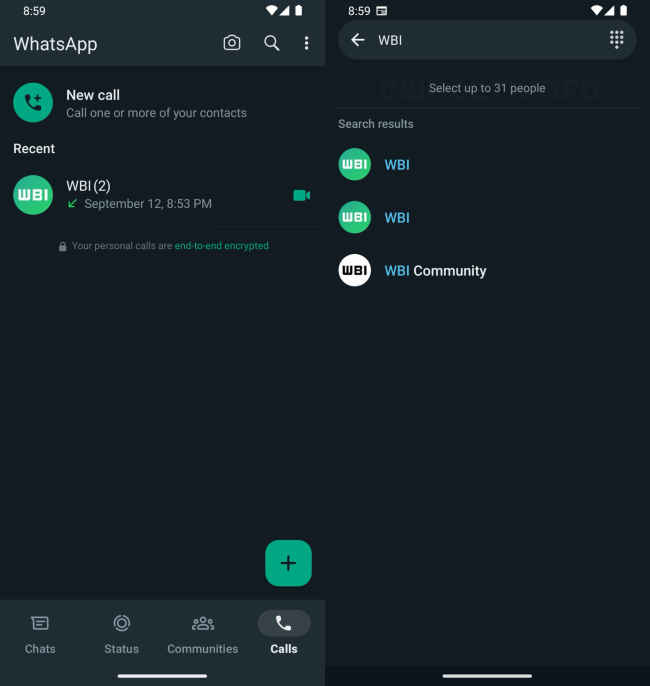
Meta-owned instant messaging platform WhatsApp is reportedly testing a feature to initiate group calls with up to 31 participants, along with minor improvements to the calls tab. It is currently being tested on Android, as per the report.
According to a report by a known WhatsApp tipster publication, WABetaInfo, the messaging platform is rolling out a 31-people group calling feature, along with a revised interface for the calls tab.
Also read: WhatsApp to verify security codes for end-to-end encryption: Why it matters?
Credit: WABetaInfo
With the new changes to the calls tab, WhatsApp users will likely no longer see call links on this screen. Also, the floating action button is expected to be updated with a plus icon.
Meanwhile, the 31-person group calling feature is expected to help users easily connect with a larger group of participants.
Also read: WhatsApp will let you swap your face with cool avatars in video calls: Here’s how
While the messaging platform already allowed group calls of up to 32 participants in the past updates, users were only able to select 15 contacts while initiating a call.
The 31-person group calling feature, along with minor improvements to the calls tab, is currently available to a limited number of beta testers on Android, according to the report.
In our opinion, the ability to initiate group calls with up to 31 participants will allow for more extensive and inclusive group conversations. This can be especially useful for business meetings, virtual family gatherings, or connecting with a larger circle of friends.
Last week, it was reported that WhatsApp had started testing a new video avatar calling feature. This feature is expected to allow users to replace themselves with avatars during video calls. Given that WhatsApp is owned by Meta, it's worth noting that Meta introduced the real-time avatar calling feature for Instagram and Messenger in July. Hence, it was only a matter of time before WhatsApp would incorporate such a feature on the platform.
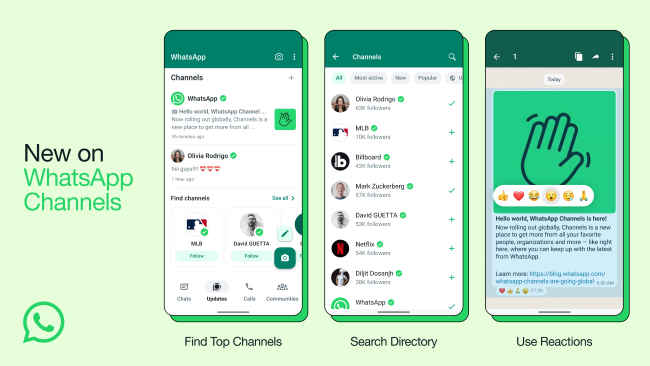
Meta has finally launched WhatsApp Channels in India. For those who are unaware WhatsApp Channels were first introduced in June and are a one-way broadcast tool for admins to send text, photos, videos, stickers, and polls.
“Today we have launched WhatsApp Channels in India and will deliver a private way for people to receive updates that matter to them. We’re also welcoming some of your favourite celebrities, sports teams, artists, creators, thought leaders that people can follow, right within WhatsApp,” Meta announced in a blogpost on September 13, 2023.
Also read: Browsing WhatsApp channels now easier with advanced search filters: Here's how
WhatsApp Channels can be found in a new tab called ‘Updates’ on the platform, where users will find Status and channels they choose to follow– separate from their chats with family, friends, and communities.
Also read: WhatsApp may soon let you message people using other apps: Here’s why
Celebrities like Katrina Kaif, Diljit Dosanjh, Akshay Kumar, and Vijay Deverakonda have launched their WhatsApp Channels. The Indian Cricket Team has also launched their WhatsApp Channel, as the country and Indians all over the world gear up for the ICC Men’s Cricket World Cup 2023.
With ‘Enhanced Directory’ users can find channels to follow that are automatically filtered based on their country. Users can also view channels that are new, most active, and popular based on the number of followers.
In WhatsApp Channels, users can also react using emojis to give feedback and see a count of total reactions. Also, whenever users forward an Update to chats or groups it will include a link back to the channel so that people can find out more.
It’s worth noting that following a channel won’t reveal your phone number to the admin or other followers. Who you decide to follow is your choice and it’s private.
Admins will also have the option to block screenshots and forwards from their channels. Admins can also decide who can follow their channel and whether they want their channel to be discoverable in the directory or not.
How to create WhatsApp Channels?
Step 1. Open WhatsApp on your phone, and navigate to the Updates tab.
Step 2. Tap the plus icon (+), and select New channel.
Step 3. Tap ‘Get started’ and continue through the onscreen prompts.
Step 4. Add a channel name to finish creating your channel.
Step 5. Customise your channel by adding a description and icon.
Step 6: Then finally tap Create channel, and you’re done.
A few days ago, Xiaomi’s CEO, Lei Jun, confirmed the Xiaomi 13T series and along with that confirmed the launch date. The launch of the Xiaomi 13T series is held in Berlin on September 26. Earlier the smartphone series was expected to launch on September 1. The Xiaomi 13T series will reportedly include two models, the standard one and the Pro model. However, a tipster has shared the renders of Xiaomi 13T and Xiaomi 13T Pro on the internet, and the pricing as well.
Previously, MSP shared the renders of the Xiaomi 13T, which revealed two colour options. However, one more colour of the smartphone has been leaked now. A tipster known as Sudhanshu Ambhore has shared the renders and prices of the Xiaomi 13T series on Appuals. The smartphone can be seen in three colour options; Black, Green, and Blue. The latter one is tipped to launch with a leather back. Apart from that, the smartphone has a big square camera module on the back where the Leica branding is also mentioned along with a triple camera setup.
Also read: Xiaomi announcing the 13T Series on Sept 26: CEO confirmed
Moving to the pricing, the tipster also mentioned the European pricing of Xiaomi 13T. He spotted the Xiaomi 13T pricing in a report by a European publication named Dealabs Magazine. However, his price leaks were entirely different than what the publication leaked. He added the Xiaomi 13T could launch in Europe at a price of EUR 699 for 8GB RAM and 256GB storage variant. The Xiaomi 13T Pro 12GB RAM and 512GB variant might launch at a price of EUR 899.
The tipster has also shared some key specifications of both of these smartphones. Both of them could feature a 6.67-inch 144Hz AMOLED display with a resolution of 2712 x 1220 pixels.
The Xiaomi 13T might be powered by the MediaTek Dimensity 8200-Ultra processor, whereas, the Pro model could be equipped with a Mediatek Dimensity 9200+ SoC. Both of them could pack a 5000mAh battery with 67-watt fast charging support in Xiaomi 13T and 120-watt fast charging support in Xiaomi 13T Pro.
Also read: Xiaomi 13T Pro new launch date, processor, display details revealed: Everything you need to know
For photography, both of these smartphones are tipped to feature a 50-megapixel Sony IMX707 primary camera with OIS, a 50-megapixel telephoto sensor, and a 12-megapixel ultra-wide lens. On the front, the phones might feature a 20-megapixel selfie camera. These smartphones are also said to feature the Leica tuning as well.
Meta-owned instant messaging platform WhatsApp is reportedly working on a third-party chats feature. This support for chat interoperability is expected to allow other people to connect with users on WhatsApp even if they don’t have a WhatsApp account. As this feature is currently under development, it is not ready for beta testers, as per the report.
According to a report by a known WhatsApp tipster publication, WABetaInfo, the messaging platform is working to meet new European Union regulations by adding chat interoperability support in an upcoming app update.
Also read: WhatsApp will soon make sharing original quality photos & videos easier
Source: WABetaInfo
The European Union has recently agreed on a significant competition reform called the Digital Markets Act (DMA). This reform will impose strict rules on major tech companies, requiring them to allow users to communicate across different apps.
WhatsApp is among the companies that must adhere to the new regulations outlined in the DMA. This is because WhatsApp qualifies as a gatekeeper service due to its status as a large tech platform with a substantial user base, meeting the DMA's criteria. In the latest WhatsApp beta for Android 2.23.19.8 update, available on the Google Play Store, it has been discovered that WhatsApp is actively working on complying with these new regulations.
Also read: WhatsApp may soon let users disable instant video message feature
For the new third-party chats feature, WhatsApp is expected to add a new section dedicated to the new regulations. As it is in development, the section appears empty and is not accessible to users.
In order to deliver its interoperability service in the European Union, WhatsApp has six months to modify the app to the new European standards. It is still unknown if this feature will eventually be available in countries other than the European Union.
The third-party chat support will likely enable individuals using other platforms to reach out to WhatsApp users, even if they don't have a WhatsApp account.
According to the report, while this broader network is expected to improve communication with people who use different messaging apps, the new feature might also raise concerns about end-to-end encryption when receiving a message from users who don’t use WhatsApp. Also, users might have the choice to opt out in the future, as outlined in Article 7 of the regulations.
Soon, Instagram and Facebook could roll out a feature that would allow users to completely remove ads from their feeds. Why such a move? This is because Europe's DSA guidelines and strict ad transparency laws can cause trouble to these tech companies. With stricter DSA and ad transparency laws set in Europe, Meta, Facebook and Instagram’s parent company could be looking at changing its business model. Reports suggest that Meta could give users an option to completely get rid of ads from their feeds.
So with these new transparency laws set in place in the EU, Meta is planning to bring out a subscription-based business model and retire its traditional business model, as per reports. This will be limited to the users in the European Union for now, as revealed by the reports.
Also read: Instagram will soon release an AI chatbot, what if it's actually risky?
Let’s try to understand this subscription-based model. For starters, with the help of the subscription, users will be able to enjoy an ad-free experience, but of course they’ll have to first pay for it. While the subscription-based model could be rolled out soon, those who don’t want to pay can continue their experience in a free version which comes with ads.
If there’s any truth to the reports then this would mean a big move for Meta. After quite a long period, it would move away from the “users-as-product” model as its business strategy.
Also read: How to download Facebook videos on your Android or iOS smartphone
As mentioned earlier, this move could be Meta’s response to the EU's Digital Services Act which demands more transparency from big tech companies in regard with their practices related to targeted advertising and content moderation. For the uninitiated, this law was passed last year but is yet to be implemented fully. This is more focused on companies that have extensive platforms like Instagram and Facebook by Meta.
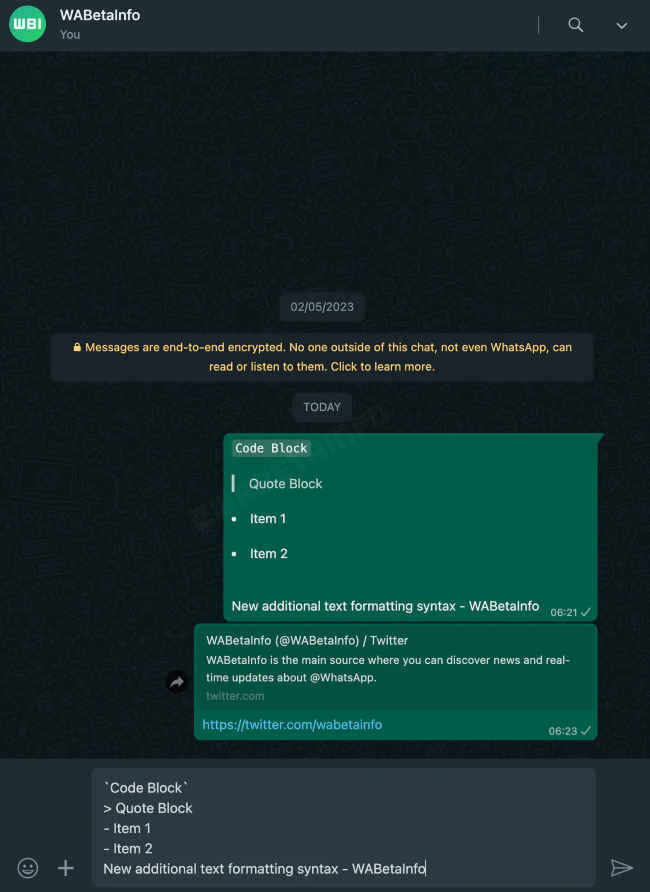
Recently, Whatsapp has rolled out a new feature that helps in sharing the pictures in HD. Now, that social media platform is reportedly testing a new beta version internally for another new feature. This new feature could be helpful for programmers, coders and software developers. This feature is said to be an easy way for users to share and read codes on Whatsapp. It is tipped to have three formatting tools and soon will be available in Android and iOS as well, as per reports.
Check out the three tools this new feature is expected to bring to Whatsapp:
A known Whatsapp tipster publications, WABetaInfo, has shared three formatting tools which could be featured in Whatsapp in the coming days. The first tool, Code Block, will reportedly be added to WhatsApp that makes it easier to read technical computer codes. The programmers can share pieces of code more clearly on the app using this tool.
Also read: WhatsApp will soon let you make AI generated stickers: Here’s how
Next up, the Quote feature will reportedly let users highlight and remember certain messages or responses in a conversation. According to the report, this new way of quoting text will allow users to select a specific part of a message and respond to it directly. This is different from the current quoting feature on the app.
Lastly, with use of the third tool, the users can make a list using bullet points and more, in the message, according to reports.
Also read: Whatsapp will increase your app security with passkey protection: Report
That was all about it. But we should note that there is no confirmation on this news from Whatsapp itself. We are hoping the company will roll out this new feature so that we can show you how it will be done. But as usual, before rolling it out, the company is expected to launch a beta version soon for testing.
Whatsapp is expected to launch a new feature which will help in increasing the security by passkey. However, WhatsApp users have various options to safeguard their accounts, such as traditional passwords and two-factor authentication and now this could be another feature, if you like your Whatsapp packed and protected. This addition will join the ranks of apps and websites that have already embraced passkey functionality. While Meta hasn't made an official announcement yet, a hidden passkey setup menu was discovered in the latest WhatsApp for Android beta version by WABetaInfo.
The passkey feature is still in development, without a current activation method. Nevertheless, this discovery strongly suggests that WhatsApp might soon offer users the choice of using a passkey instead of a conventional password.
Also read: WhatsApp a stranger without saving their contact is now easier than ever
In essence, a passkey is part of an industry-wide initiative aimed at enhancing security during authentication. Rather than relying on standard passwords, users can verify their identity through facial recognition or biometrics, eliminating the need to create and input a regular passcode. This technology has originated from the FIDO Alliance and can be found in Google, Apple and Microsoft.
Apple has rolled out a new feature that uses passkey and it automatically assigns it to Apple ID accounts for users on iOS 17, iPadOS 17, and macOS Sonoma. This innovation permits users to authenticate themselves on Apple-related websites using their passkey as a credential, bypassing the requirement for a password.
Apple users have been able to generate and store passkeys using Safari and iCloud Keychain since iOS 16. Now, with iOS 17, this capability extends to third-party apps. Recent announcements by TikTok and the well-known password manager 1Password also highlight their support for passkeys.
Also read: WhatsApp lands on Wear OS 3 smartwatches: Here’s all you need to know
Although, more information such as the launch date of this new Whatsapp passkey feature has not been announced yet. So stay tuned for the official news.
Also read: Google’s new passkey explained: Your password-less future’s here
Scared of someone tracking you with an AirTag? Yes, AirTag, a device by Apple that was created to help users find a lost item and have peace of mind. However, in the hands of bad actors, it could and has become a cause of concern. There have been several reports about this. While Apple did come up with built-in features on iOS for alerting you of unknown trackers following you, Android didn’t have anything until now.
With a new update, Android lets you detect and thwart unwanted tracking by AirTag and similar trackers. Google is releasing the update to Android 6.0 and above starting today that enables a new option within the Safety & Emergency setting. Let’s see how this thing works.
Android Unknown Trackers Alert
Unknown tracker alerts is an upcoming @Android feature where your phone alerts you *and* locates unfamiliar tracking tags that have been separated from their owners and are seen moving with you. Look out for more on this later this year. #GoogleIO pic.twitter.com/o2MjuETYXL
— Google (@Google) May 10, 2023
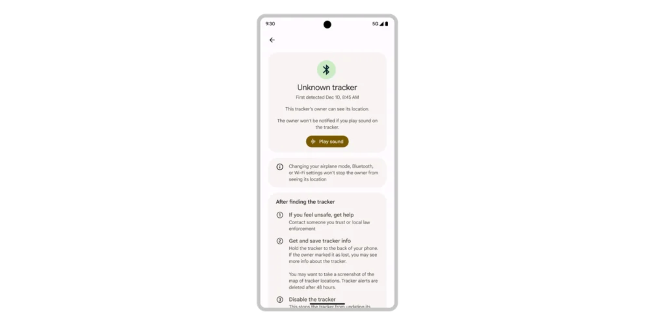
Once you have this update, you could go to the Android Settings menu > Safety and Emergency option > Unknown Tracker Alerts, and then tap on the “Scan now” option. This takes about 10 seconds to find the tracker snooping on your moves.
Also Read: Samsung Galaxy Z Fold 5 and Z Flip 5 price in India revealed: See how much they cost
Additionally, the new Android feature can automatically scan and alert you if it detects an unfamiliar tracker near your phone. You could find that device and disable it.
Tapping the notification shows you more details about the tracking device (like a serial number) and perhaps even the device owner. It gives you a map of where all this thing has travelled with you.
To locate the tracker, you can hit on the “Play sound” option and you’ll hear a chirp coming from the tracker. It then gives you instructions for disabling the thing.
Now, even though, this is primarily a partnership between Google and Apple, other players like Samsung, Tile, Eufy Security, Chipolo, and Pebblebee are also shown interest in drafting the aforementioned specifications. So, this feature should work to detect and disable trackers from these brands too. If they are supported at the moment isn’t clear.
Also Read: iPhone 15 Pro could be priced higher and come with a new actionable button
Finally, while we appreciate this feature’s potential to deter nefarious tracking by stalkers and abusers, this does aid thieves in disabling any tracker with the stolen item, and avert any attempts at recovering the same. Well, that’s the price you got to pay now.
Poco M5 made its debut in India in September 2022. The smartphone was launched at a starting price of ₹12,499. Surprisingly, now the Poco M5 can be bought from Flipkart at just ₹7,749. Here’s how:
Flipkart has offered a 45 percent instant discount on the vanilla model of Poco M5. The smartphone is currently available on Flipkart at a price of ₹8,749 but you can take advantage of the bank offers to reduce the price. 10% off on Axis Bank Credit Card and EMI Transactions up to ₹750. 10% Instant Discount on Citi Credit Card and EMI Txns up to ₹1,000 . 10% off on Axis Bank Debit Card and EMI Transactions up to ₹500. 10% Instant Discount on Citi Debit Card Transactions up to ₹500. ₹750 Off On ICICI Bank Credit and Debit Card Non EMI Transactions. 5% Cashback on Flipkart Axis Bank Card.
Also read: Poco M5 Review: Chic and Formidable
You can also use the exchange offer to get an additional discount if you want to trade your old phone. The exchange offer with this phone promises a discount of up to ₹8,200.
Poco M5 comes with a 6.58-inch IPS LCD display with a resolution of 1080 x 2400 pixels. It is protected by Corning Gorilla Glass 3.
The smartphone is powered by the Mediatek Helio G99 and runs on Android 13 OS but can be upgraded to Android 13. It boasts a 5000mAh battery with 18-watt fast charging support.
Also read: Best Mobile Phones under ₹12,000 in India (July 2023)
There is a triple camera setup on the back which holds a 50-megapixel primary camera, a 2-megapixel macro lens and a 2-megapixel depth sensor. On the front, it has an 8-megapixel selfie shooter. A good overall phone to get, at the lowest price it's one of the best money can buy.
Meta recently rolled out a new Microblogging App, very similar to Twitter, namely Threads. People showed their love to threads very quickly or maybe they are just needy because Elon Musk has made some unexpected changes which they didn’t really like.
If you are a Threads user and likes to keep top notch security of your social media then in this article you’ll find how to enable two-factor authentication on your Threads profile.
Also read: Are Elon Musk's Twitter mistakes responsible for Threads success?
Methods of two-factor authentications
There are three methods by which you can use two-factor authentication on Threads.
First is an authentication app which will be recommended by Threads. You need to download the app and link your Instagram account with it as Threads uses your Instagram as an identifier. This authentication app will generate a code which you will need while logging in. The code changes within seconds.
Also read: Threads on Windows 11 desktop: Get it running in 9 simple steps
Second authentication method can be used through SMS. You will get a code on your registered mobile number through SMS which you will have to put while logging in.
Lastly, there is also an option to use Whatsapp as your two-factor authentication method. You need to enable text messages to activate this method.
Steps to enable two-factor authentication on Threads
Step 1: Open the Threads app and go to profile.
Step 2: Tap on the two lines on the top right corner.
Step 3: Then select Account and then tap on security, which will take you to the Meta Account Centre.
Step 4: Tap on Two-Factor Authentication and then select your Instagram account as I mentioned above that it is used as an identifier.
Step 5: Choose the method of authentication and voila!
WhatsApp screen sharing feature has been spotted by WABetaInfo on the app’s latest beta update. WhatsApp is late to bring this feature as it is already found in Zoom and other communication apps. Let’s see how WhatsApp has implemented the screen-sharing option.
WhatsApp screen-sharing: How it works
Screen sharing has been found on WhatsApp beta for Android version 2.23.11.19. I also have this version of WhatsApp beta on my phone. However, I didn’t have the feature yet. It must be getting rolled out in phases.
Gladly, from the screenshots shared by WABetaInfo, we get to see the WhatsApp screen-sharing UI.
We see in the WhatsApp call menu, there's a phone-with-right-arrow icon on the bottom menu. Clicking that button starts the screen sharing. Well, the screen you’re currently on gets shared.
Also Read:
- WhatsApp will let you set username: Will this improve your privacy?
- WhatsApp edit feature to put an end to awkward mistakes in texting
- WhatsApp sticker maker on Android will make your chats more fun very soon
In this present version, there is a disclaimer intimating to the users that the screen will be shared and that the app will have access to the on-screen elements during this time. This could include sensitive things like passwords, messages, payment details, photos, audio, etc.
You can click the start button to begin recording.
Note, WhatsApp screen sharing may not work with older versions of the app. Also, there could be some restrictions on the number of people you could get to share your screen with.
In the case of Zoom screen sharing, only the person sharing the screen should have the ultimate control over what’s being shared and what others can see. It also has a Whiteboard sharing feature wherein all the participants can annotate on the board. There is even an option to share video playback with others.
It will be interesting to see Meta introduce all these abilities to the WhatsApp screen-sharing facility.
At the Microsoft Build 2023, Satya Nadella and team unveiled Copilot for Windows. Copilot is a new virtual assistant powered by ChatGPT that is accessible from the Windows 11 taskbar. It is the third Microsoft chatbot after Cortana and Clippy. Yeah, some of you may be too young to remember Clippy. So, now that Copilot is available on Windows, the question we have is — can Copilot do what others couldn’t? That is to last as a chatbot that Windows users live by. Will the third time be the charm for Microsoft virtual assistants?
Let’s see.
Is Copilot the same as Bing Chat on Microsoft Edge?
Well, Microsoft Edge browser users will know of Bing Chat, which is accessible by clicking the (b) icon on the right corner of the top menu bar. For layman's understanding, the Copilot is based on this Bing Chat feature of Edge only and is now baked into Windows. You can tap the Copilot icon on the Windows taskbar with a hexagonal logo. A sidebar opens on the right side and you can access it over all apps and screens you are interacting with.
If you recall, Cortana too had a dedicated button on the Windows 10 taskbar and so, Copilot seems like an advanced Cortana for Windows 11. And if you ask us, what about Clippy, well, Copilot appears to be Clippy on droids. Or dare we say, Clippy unclipped!
While all three virtual assistants were integrated with key Microsoft products and were capable of providing information, answering questions, and completing tasks, Copilot is more reaching and powerful than the rest two.
Use of Copilot on Windows
1. You can ask questions and clear your doubts with Copilot.
2. You can ask it to summarize copied text (even blocks of them), files (just drop the and ask it to sum up), and the content that’s on the app/window you are presently on.
3. Since it is integrated into Windows, you can get Copilot to change settings. Say, ask Copilot to adjust the Focus settings or turn on Dark Mode, and it will do that in seconds.
Microsoft’s head of Windows and devices, Mr Panos Panay says “It makes every user a power user.” We hope it does.
Instagram was down for the second time in the last 4 days. It was a global outage and many users were reportedly affected by this. The Instagram feed, stories and messages section were not accessible. Here are user reactions and memes about it.
Instagram outage: What happened?
Meta spokesperson, Dave Arnold, in a statement to The Verge confirmed the Instagram outage, revealing, “We’re aware that some people are having trouble accessing Instagram. We’re working to get things back to normal as quickly as possible and we apologize for any inconvenience.”
The issue seems to have been fixed at the time of writing this. However, earlier today, I was facing difficulty refreshing the feed, messages weren’t sending, Reels weren’t opening and some reactions weren’t also functioning. Many users across the world have come across similar problems.
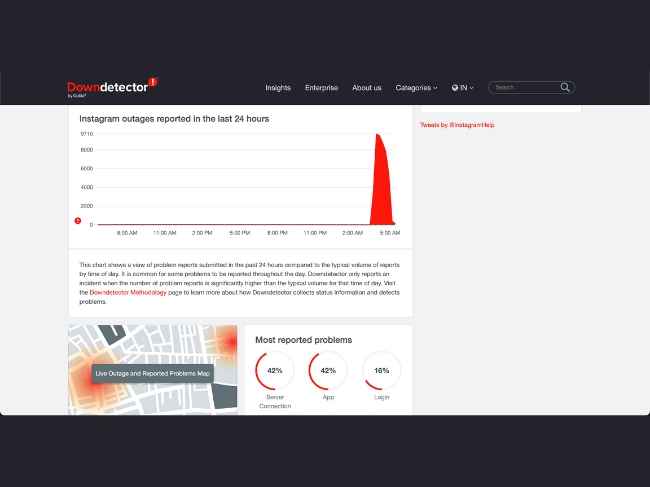
The problem pertained to the app only, something which the Downdetector website also points out. The first reports of the outage apparently started appearing around 3:30 AM (IST) and there were about 1,75,000 reports at its peak.
So when something like this happens, you know where people rush to. Yes, Twitter!
Instagram Outage: Twitter reactions
Everyone rushing to twitter since #instagram is down #BreakingNews pic.twitter.com/4WZHkxI2d7
— Janete Weinstein (@JaneteWeinstein) May 21, 2023
BRO WE GET IT INSTAGRAM IS DOWN pic.twitter.com/EGEZ3ynkce
— ️️ (@DestroyingWrld) May 21, 2023
Everyone linking up on Twitter since instagram is down pic.twitter.com/0Z5AsgP8uj
— Mike (@hiciano_michael) May 21, 2023
e girls on their way to go on twitter after instagram shut down pic.twitter.com/2Ig9PnJou5
— (@VinnyC0l0rad0) May 21, 2023
me coming to twitter to see why My Instagram ain’t working instagram down pic.twitter.com/67thufdBlh
— Jullien (@librv_) May 21, 2023
My Instagram went down pic.twitter.com/48xBmWZ8ox
— Everything Out Of Context (@EverythingOOC) May 21, 2023
Meta has been known to have been working on a Twitter alternative for some time now. Even those unaware of the same could guess that Zuckerberg’s company would be cooking up something to take on Twitter. Historically, the company has cloned a lot of its competitors and primarily added the key feature(s) of the rival app to Instagram. This time it is going to release an Instagram app for text-based conversations, according to a leaked marketing slide shared by Lia Haberman.
Meta’s been briefing creators on it’s upcoming text-based app — now looking at a possible late June launch. Details are in my newsletter but I’ll list some highlights pic.twitter.com/KYqqXjrRmD
— Lia Haberman (@liahaberman) May 19, 2023 Instagram’s Twitter alternative: What we know so far
In her ICYMI newsletter, Ms Haberman says Instagram’s Twitter-like app will be here by the end of June. The company is yet to give it an official name. However internally, it is being called P92 or Barcelona.
You will have to sign in to the new app using your Instagram username and password. Your handle, verification, bio, and followers will automatically migrate from Instagram. Even those whom you have blocked on the main app won’t be here to bother you in this app.
Meta will apparently incorporate a solid moderation policy “equipping you with settings to control who can reply to you and mention your account”.
The UI of the app consists of text posts and threads like Twitter but the heart, comment bubble, and paper plane-shaped share icons are comparable to Instagram.
It is said to support up to 500 characters, along with the ability to attach photos, videos, and links.
Another highlight of this app is that there will be a decentralized facility to connect with people on other similar platforms like Mastodon. You could be looked up and followed on these other decentralized apps thanks to the underlying ActivityPub architecture.
Meta considers this app as a way for creators, public figures, and probably regular users of Instagram to share their interests.
Instagram’s Twitter alternative: Possible strengths and weaknesses
Strengths
1. Meta is a giant in the social media landscape and it can channel its existing userbase into this new Twitter alternative app.
2. Since it’s a new app, Instagram could give it new and unique features and benefits.
Weaknesses
1. Since this is one of the many apps or features the company has to focus on, it might not get the exclusive attention that Twitter gets from its team.
2. This could attract regulatory concerns and restrictions as Meta is behind it.
3. People might not take the new Meta app in good faith or it would turn out to be a dud like Instagram Notes.
Twitter’s problems could be an opportunity for Meta while the growing number of competitors like Mastadon and Bluesky could be a threat to its ambitions.
Should Twitter be worried?
1. For all of the aforementioned strengths and opportunities of Meta, the new Instagram app for text-based conversations is a threat to Twitter.
2. If Meta’s app turns out to be even decent, it could attract Twitter users and many of these users are likely to already have an Instagram account. So the transfer may be seamless.
3. Instagram is already a bigger advertising platform and it could take ad dollars from Twitter.
Now although only time can tell if all of these things turn out as we predict or assume. But, it will be careless of Twitter to ignore the potential threat it has from this Instagram app.
Google Contacts brings the option to add birthday details to your contacts and get timely reminders. No more forgetting or missing your special someone’s birthday. This is being rolled out gradually and so, first, we will see if you have got the feature. Then, set the birthday reminder for one of your contacts.
Google Contacts version 4.7.26.x has got this feature. I updated the app from Google Play Store and mine is currently on v. 4.8.17.529259023.
You can go to the Play Store and search for the Google Contacts app, and update it if an update is pending. You can find the app version here in the About This App section or go to the App Info page within the settings.
The changelog doesn’t mention the feature.
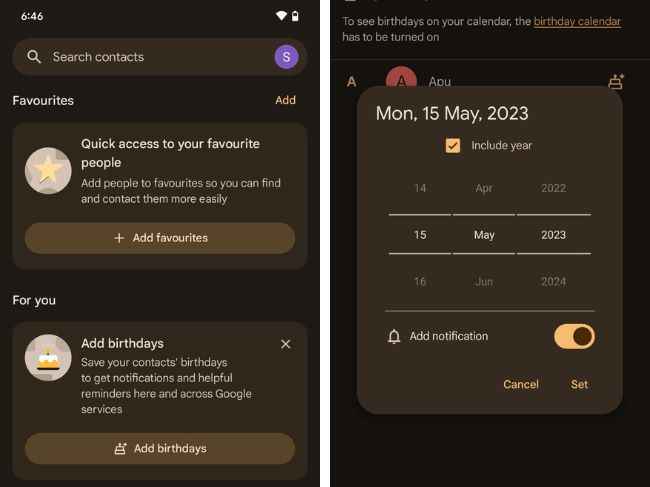
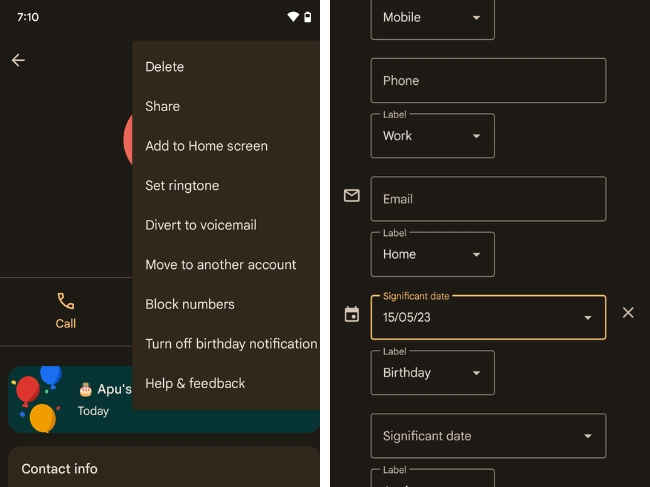
So, you will have to open the app once it is updated. Then, tap on the Highlights option. Within that section, you will see the Add Birthdays feature tagged “For You”.
Here’s how the new birthday feature on Google Contacts works.
How to set birthday reminders on Google Contacts (Android)
It is simple.
1. Open the Google Contacts app.
2. In the Highlights tab, you should see the “Add birthdays” option. Tap on it.
3. All your contacts saved on Google Contacts will appear here. Click on the one to which you want to add birthday details.
4. Tapping it you will see a pop-up window showing the scrolling date counter. You can scroll/swipe up-down/tap on the Day, Month, and Year fields to change them. You can choose to show/mark the year. Unticking the “Include Year” option would hide the year field.
5. Ensure the Add notification toggle is turned on (to the right). Press Set once you are sure that everything’s entered correctly.
Voila! Now, you should be receiving your contact’s birthday reminder alert when that day comes.
If you want to turn off the notification, you can hop over to the contacts page and click the 3-dot menu and tap on Turn Off Birthday Notifications.
And if you want to edit the date, you can do so by tapping on the Edit button (the pencil icon), and scrolling until you see the Significant Date option. Tap it and change it. That’s it.
All in all, a neat feature that many of us eagerly wanted. Thanks, Google!
WhatsApp is rolling out the ability to edit sent messages. But the feature is available only in WhatsApp for Android beta version 2.23.10.14 and above. Here’s how to get the WhatsApp beta update and this new feature.
How to get the WhatsApp beta update
1. You can get the WhatsApp beta update from Google Play Store. You can enrol into the WhatsApp beta program at this link.
2. Click on “Become a Tester”. Ensure you are logged in to Google Play with the Google Account you want.
3. You may have to update your WhatsApp. Open the Play Store and search for WhatsApp. Click on the update option.
4. Once updated, you should have WhatsApp for Android beta installed on your device.
Let’s check if you have the edit option for WhatsApp messages.
How to edit WhatsApp messages
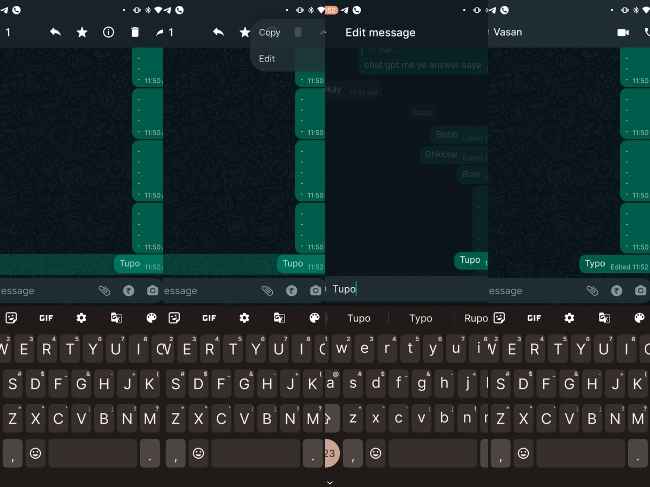
1. In case you sent a wrong message or a message with a typo/spelling mistake, the message can now be edited. You have to open the WhatsApp chat window where the message is present.
2. Hold and press the message you want to edit.
3. Click on the three-dot menu option in the top right corner.
4. Tap on the edit option.
5. The text field and keyboard appear. Make the required changes. Click the tick option when you are finished editing.
6. The newly edited message will appear with an “Edited” tag on both the sender's and receiver’s end.
You get a 15-minute window to make the edit. So, it’s ideal for typos. You can also edit multiple times in this window.
Currently, the feature is available on Android only. iOS users should, however, get it soon. Needless to say, the feature will be available to beta users first. After the major bugs (if any) are ironed out in the testing phase, the ability to edit WhatsApp messages should reach the general public.